Select & click the TRACKING button on the top main menu and you will be presented with Tracking page.
Enter your consignment number in the field provided.
- The entire consignment number must be entered for the Tracking search function to work.
- Tracking information is in real-time, where 4G or better mobile signal is available at delivery location.
- For more information on Tracking Numbers see ‘What is a Tracking Number?’ FAQ.
Select & click the TRACK button.
- A new window will open and display any available Tracking information.
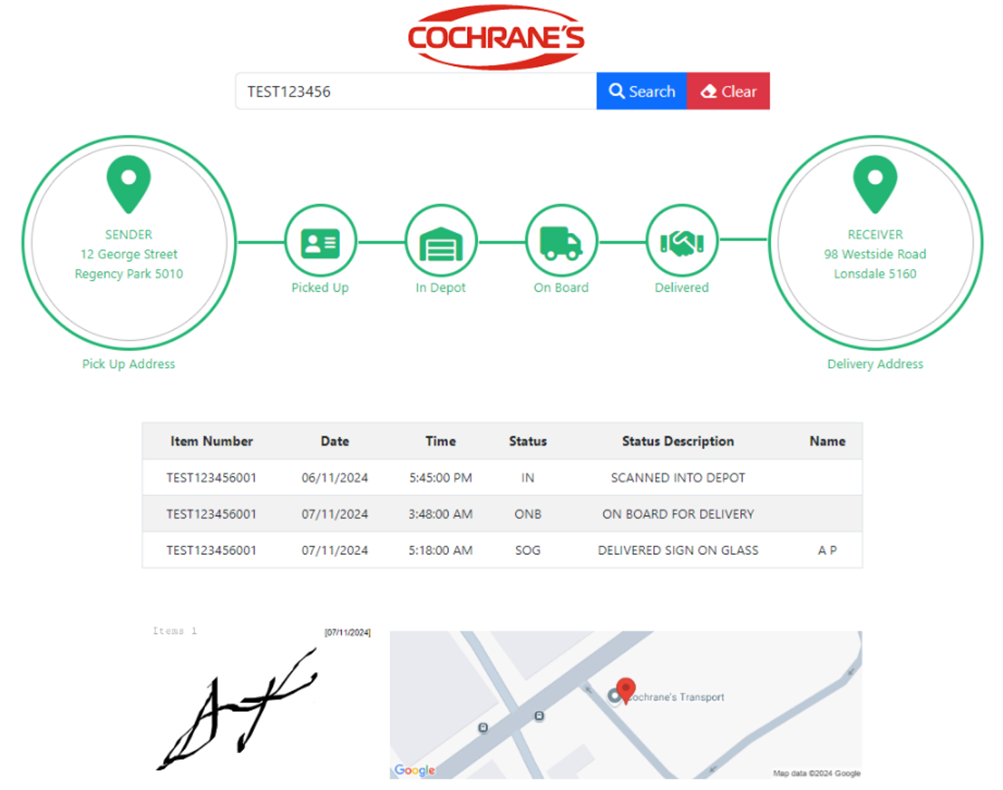
- An example of a completed delivery tracking is shown below.
- Where the SENDER-Picked Up-In Depot-On Board-Delivered-RECEIVER icons are shown in green this indicates these delivery stages have been completed.
- Where icons are shown in grey this indicates stages that are incomplete.
- For completed deliveries the Sign On Glass image with date-time stamp and a map with the delivery location pinned is shown beneath the icons.